
Multi-Factor Authentication (MFA) is an essential tool against increasing cyber attacks targeting educational institutions, businesses and individuals to obtain confidential data. They do this by collecting usernames and passwords and using these details to compromise systems.
You already sign in using your Griffith username and password. MFA adds a second form of identification to confirm that it is you logging in, such as a passcode sent to your computer or mobile device. PingID is the software that we use to enable MFA.
Frequently asked questions
When you access Griffith services or applications, you will be required to authorise the sign-on using Multi-Factor Authentication (MFA).
MFA ensures that our accounts are highly secured with not just one, but multiple layers of security.
PingID is the software we use to enable MFA.
If you have access to your registered device, you can manage your MFA by following the guides on our support pages for Staff and Students
When to call the IT Service Centre or visit a Tech Assist bar for support
- You don't have access to your registered device: if your device has been lost, stolen or damaged, traded in or replaced, forgotten or left at home or work
- PingID app issues: if the PingID app was uninstalled or removed, your device was reset to factory settings, or if you experience authentication or number matching failures
- Setup problems: if you encounter difficulties setting up or configuring your MFA device or app.
The IT Service Centre cannot add or remove registered MFA devices or make changes to your account in response to requests submitted by email, chat or web forms.
Phone
- Within Australia: 07 3735 5555,
- Outside of Australia: <Your country’s international dialling code> + 61 7 3735 5555
-
- select 2 for IT support then
-
- select 1 for Multi-Factor Authentication enquiries
In person
To request MFA support in person visit the Brisbane South (Nathan) or Gold Coast tech assist bar
Unable to phone or visit a campus location?
To protect your privacy and security, assisted management of your MFA devices and account are only available via phone or in person at tech assist bars. A verbal verification of your identity is a security requirement for our staff to assist with managing your MFA account.
You may request a call by using the Report an IT Issue form. You will need to include a valid contact phone number and a preferred contact time in AEST time and the IT Service Centre will phone you. Refer to the IT Service Centre operating hours.
Most popular requests
How to setup and use MFA
At Griffith University the PingID application is used to enable Multi-Factor Authentication (MFA). The PingID application is available for Windows and Apple computers as well as Android and iOS devices. Follow our setup guides when installing PingID.
Have you registered a second device?
If you have not already registered an additional device for MFA, now is the time! It is important to do this so that you can still access all your accounts and applications, even those times when you are unable to use your primary device.
How to use MFA without your primary device is the number one query that our IT Service Centre staff receive regarding MFA. So to ensure you are not caught out, set up your second device as soon as possible. Use our How to set up and use MFA guides to install and configure MFA on your device.
MFA Number Matching
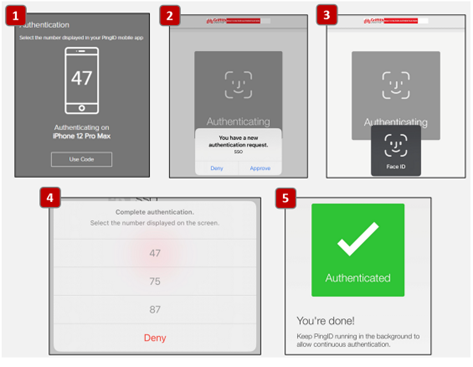
When logging in to the Griffith network or services, you will be required to match the number you see on the MFA login page to the number within your PingID application. This additional step in the process ensures a reduced chance of leaving an open door to our network for potential scammers and looks like this:
YubiKey
A YubiKey is a USB flash drive like device which plugs into your computer and, along with your password, is used to authenticate your identity. A YubiKey can be used either as a primary or as an additional method of authentication where a smart device is not available.
Contact us
Speak to our friendly team who is happy to help you when needed